

Free tools / SOP Builder
Write down a process anyone on your team can follow.
Start from an example or from scratch. Your SOP builds as you type, so you can see the finished document the whole time. The PDF is ready to review with your team.
- Free
- About 5 minutes
- No credit card
Start here
Pick an example to edit, or start from scratch.
This is an example. Change it to match your process.
One step per line. Start each with a verb, like “Confirm the time zone.”
Add more detail (optional, makes the SOP stronger)
Keep it with your other procedures. Send this SOP to Business OS, our free workspace for procedures, KPIs and follow-ups. It stays in this browser and nothing is sent to us.
Get your plan as a PDF
- Your SOP as a clean, shareable PDF
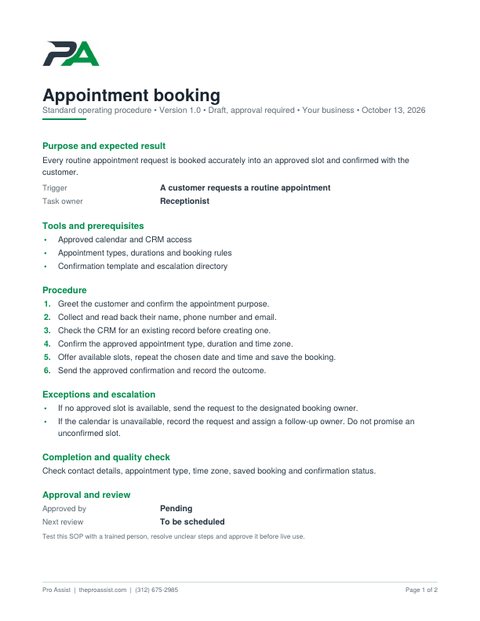
- Purpose, owner, steps and exceptions on one page
- Approval and review lines for your team
- Ready to print or send
Your plan is downloading
If nothing happened, tap the button below. Your PDF stays on your device.
Book a free 15-minute walk-throughNo card, no obligation. Or call (312) 675-2985.
Have more than one procedure to keep track of? Keep them all in the free Business OS.
What is in your PDF
The same document you see in the preview, laid out to print or share.
- The result you expect, the trigger and the owner
- Numbered steps anyone can follow
- What to do when something goes wrong
- A completion check
- Approval and review lines
How it works
- Pick an example or start freshThree common processes are ready to edit: booking, CRM updates and follow-ups.
- Edit it and watch it buildThe document updates as you type. Nothing is sent anywhere yet.
- Get your PDFAdd your email and it downloads right away. Or copy it as text with no email at all.
Questions
What makes a good SOP?
One owner, a clear starting point, short steps that each begin with a verb, and a note on what to do when something goes wrong.
Can I edit the result?
Yes. Change any box and the preview updates. Copy it as text to keep working in your own document, or get the PDF to share with your team.
Why would I write this down?
It is the first thing a new person needs, whether that is a hire, a contractor or a Pro Assist receptionist. Written steps make handoffs faster and results more consistent.
Is this really free?
Yes. The tool, the copy button and the PDF are free. You do not need a card, and you are not signing up for anything.
What do you do with my email?
We use it to follow up about your SOP, and a person at Pro Assist may email or call you about it. We do not sell your information. The Privacy Policy has the details.
Can I keep track of several SOPs?
Yes. The free Business OS keeps all your procedures in one place, links each one to the KPI that measures it, and tracks follow-up actions. It saves in your browser, with no sign-up.
Want a trained person to follow it?
A free 15-minute call. We will review your SOP with you, and tell you honestly whether a Pro Assist receptionist or assistant is the right fit.